
Last Updated: 10/21/2026
What is PayFlex?
PayFlex is Cover Whale's secure online payment portal. Insureds use it to make their down payment when the policy is financed through a Premium Finance Company (PFC), or to pay in full (PIF).
Please note there is a distinction between a down payment, a Pay-in-Full (PIF) transaction, and a loan installment payment. Down payments and PIF transactions are handled through PayFlex, while loan installment payments are collected directly by the PFC.
How Will the Insured Receive the Payment Link?
After the bind is requested, the insured pays through the Policyholder Portal.
- DocuSign email: The insured's DocuSign email contains one link, to the Policyholder Portal. It does not include a payment link. This is intentional. The agent's DocuSign email does not include a portal or payment link.
- Policyholder Portal: The portal shows the insured the next step they need to complete, either signing or payment. See Sign First or Pay First below.
- Welcome email: The new business or renewal welcome email also includes the payment link.
Important: Agents should not be making payments to Cover Whale for the insured. Doing so creates a compliance risk — any agency found to be handling insured funds in this manner may be flagged to our compliance team for review. All payments must be made directly by the insured through the secure PayFlex payment portal. Note: This also applies to agents making payments to premium finance companies on behalf of the insured.
Example emails: New Business and Renewal
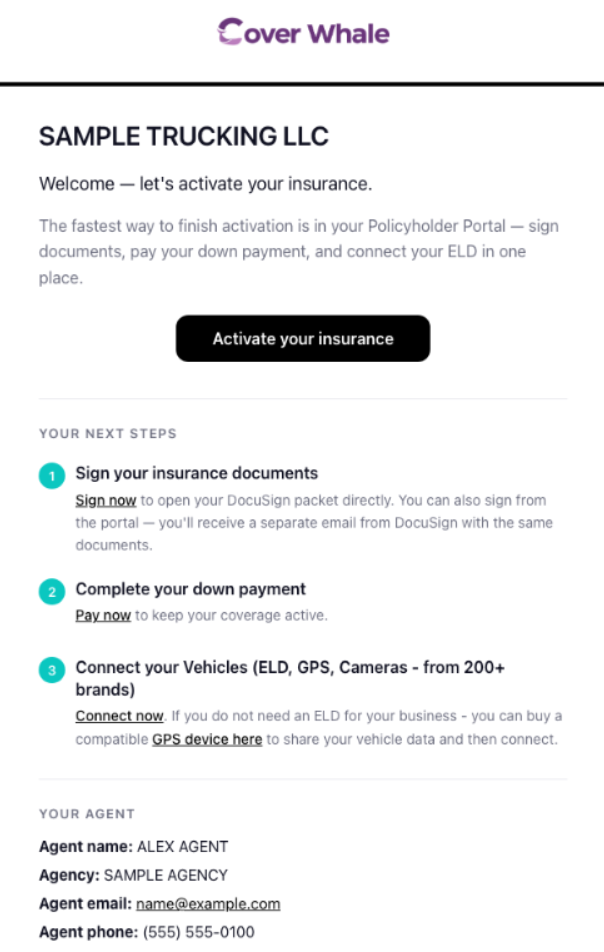
- Reminder emails (Action Required) are sent daily at 2:00 PM ET for 4 days after the welcome email, until the documents are signed and the payment is made.
- If a California surplus lines form (SL-2) is needed and still missing, the agent will receive an Action Required reminder email. The policy will not bind until the SL-2 is completed, even if everything else is signed and the down payment has been made.
Example emails: Endorsements
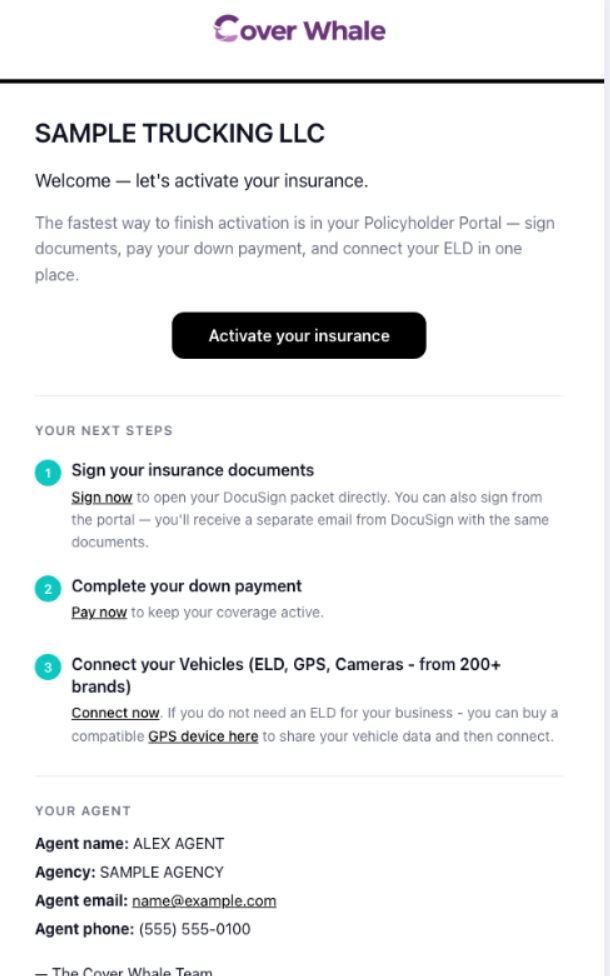
Other emails sent when a payment is due
- A driver record (MVR) review that adds premium to the policy.
- A reinstatement that results in additional premium and requires payment before the policy can be reinstated.
💡 If the insured cannot find their link, ask them to use the Policyholder Portal link in their DocuSign email. If that email was deleted or can't be found, the insured can request their Policy portal link, which will be sent directly to the insured.
Sign First or Pay First
The Policyholder Portal shows the first step that hasn't been completed yet. The order depends on whether there are documents to sign.
- Sign first, then pay: New business, renewals, and endorsements financed with Honor Capital, Capital, or National Partners require signed documents. The payment option will not appear in the portal until both the agent and the insured have signed.
- Pay first: Pay-in-Full endorsements and FIF endorsements don't require signatures, so the portal shows the payment option right away.
Even if a payment is made first, the policy or endorsement won't be completed until all required documents are signed.
Payment Methods Accepted
The insured can pay using:
- ACH (Bank Account): The insured links their bank account through Plaid, a secure bank authentication service. They log into their bank directly inside the payment portal — no bank account numbers are entered manually.
- Credit Card: Accepted, but a processing fee applies and is added to the payment amount.
- Debit Card: Accepted, but a processing fee applies and is added to the payment amount.
Important: Raw routing and account numbers are not accepted. All ACH payments must go through the Plaid bank login flow inside PayFlex as a security measure. Plaid is used to verify that only the authorized account owner is approving the transaction — Cover Whale never sees the insured's login credentials, routing number, or account number.
Saving a Payment Method
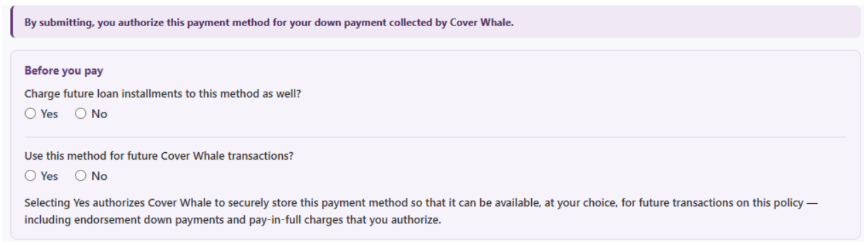
Effective 8/10/2026, PayFlex asks whether the payment method should be saved for future Cover Whale payments. This question must be answered before the payment can be completed. Any payment methods that were saved prior to 8/10/2026 were removed and are no longer available.
- If Yes is selected, the method is saved to that policy and will appear as an option for anyone who makes a payment on that policy going forward.
- Saved methods are never charged automatically. The person making the next payment simply sees the saved method as an option they can choose to use.
- Depending on the premium finance company, an additional question may appear at new business asking whether future loan installments should also be charged to that method.
Example of what the payee may see depending on the premium finance company:
Important for agencies: This is another reason payments should always be made by the insured. If an agency makes a payment and saves its payment method, the insured may select that saved method for a later transaction, resulting in a charge to the agency's account. Cover Whale is not able to reverse those charges, and the agency would need to contact the insured directly for reimbursement.
Payment Link Expiration — What to Tell the Insured
Payment links are time-limited. Make sure the insured knows to complete payment promptly.
New Business
The link is valid until the policy effective date, or 5 days from when the bind was initiated — whichever is later.
Endorsements
The link expires 5 calendar days from when the endorsement was initiated (request to bind). The endorsement effective date is not factored in.
This window cannot be extended. If the link expires, the endorsement must be restarted, and the original effective date can no longer be honored.
After Payment
The insured does not receive a "payment received" or "policy issued" email from Cover Whale. The bound email with the policy documents is sent to the agent only.
Troubleshooting Common Questions
"There's no payment link in my DocuSign email."
- That's expected. The DocuSign email is for signing documents. Once everyone has signed, the insured can pay in the Policyholder Portal using the link in that same email.
"I can't find my payment link."
- Ask them to use the Policyholder Portal link in the DocuSign email they received after the bind was requested.
- If they deleted the email, they can request their Policy portal link, which will be sent directly to the insured.
"I signed, but I don't see the option to pay."
- When documents need to be signed, both the agent and the insured must sign before the payment option appears in the portal. Confirm that both parties have signed.
"My bank won't let me connect through the payment portal."
- Some banks restrict third-party login tools, and if that occurs the insured will need to contact their bank directly to allow access. At this time, we are not aware of any banks that are currently restricted.
- Cover Whale cannot override bank-level security restrictions.
"I already paid — why does it show otherwise (why did the policy/endorsement not bind)?"
- First, confirm all required documents have been signed. A policy or endorsement will not bind until both signing and payment are complete.
- If the payment was made through the Cover Whale payment link, contact the Cover Whale Billing Team at billing@coverwhale.com to look up the payment session status. PayFlex logs every step of the checkout process, so the team can verify exactly what happened.
- If the payment was made directly to the premium finance company instead of through the Cover Whale payment link, the policy/endorsement won't bind — the down payment is meant to be made by the insured to Cover Whale. If a payment was made to the PFC, the insured will need to contact them to request a refund of that payment, and then make the down payment to Cover Whale through the Policyholder Portal.
"A payment was charged to the wrong account."
- This can happen when a payment method was saved by someone other than the insured and later selected for a new transaction.
- Cover Whale cannot reverse the charge — reimbursement will need to be arranged between the agency and the insured.
- To avoid this, the insured should make all down payments and Pay-in-Full payments, and should decline to save the method if the account is not theirs.