
Last Updated: July 2026
How to Request Federal and State Filings
Federal and state filing requests can be submitted during the initial application or after the policy is bound. Using the built-in filing request options helps ensure the fastest review and processing.
Requesting Filings During the Initial Application (Recommended)
The quickest and most efficient way to request filings is during the policy application.
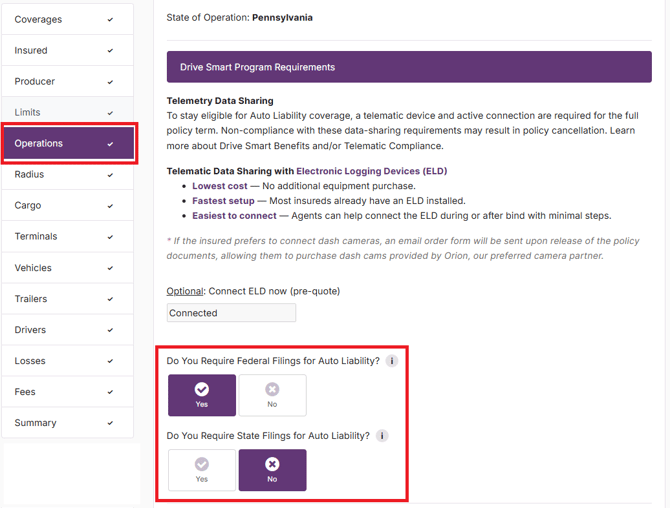
Within the Operations section of the application:
- Select Yes for Federal Filing to request a 91X filing.
- Select Yes for State Filing to request a Form E filing. (For California policies, this option refers to an MCP-65 filing instead of a Form E.)
- If the state requires additional information (such as a California CA#), enter the required information in the designated field.
These selections are automatically communicated to our Operations team immediately after the policy is bound. Filing requests are typically reviewed and completed within one business day of binding, often sooner.
Important:
- Enter all required state-specific identification numbers accurately.
- Do not use placeholders such as "TBD," "Pending," or dummy numbers, as they may result in filing delays or state rejections.
- For CA ID, the format is 6 digits. If you have a 7-digit number with a leading zero, remove the leading "0" before entering it into the application.
Requesting a Federal or State Filing After the Policy Is Bound
If a Federal Filing (91X) or State Filing (Form E or California MCP-65) was not requested during the initial application, it can be requested through an endorsement.
- Open the policy.
- Select Create Endorsement.
- Navigate to the Operations tab.
- Select the desired Federal Filing and/or State Filing options.
- Complete the endorsement by selecting Request Quote and then Bind.
Like requests made during the initial application, these filing requests are automatically queued for review and are typically completed within one business day of the endorsement being bound, often much sooner.
Other Filing Requests
The application currently supports requests for the most common filing types. Some filings require additional review and cannot currently be requested through the application, including:
- Non-domicile Form E requests
- Other state-specific financial responsibility filings
For a complete list of filing types Cover Whale can issue, please see What Form of Filings Can Cover Whale Issue and How Long Do They Take?
If you need to request a filing that is not available through the application or have questions about filing requirements, please contact us at hello@coverwhale.com.