
Last Updated 4/22/2026
Any driver who is no longer operating under the policy should be excluded while remaining listed on the policy. This ensures the policy maintains accurate driver history. Please note when a driver is excluded, they are not covered under the policy and must not operate any insured vehicles under any circumstances.
To exclude a driver, follow these steps.
- Click Create Endorsement.
- Enter the Effective Date and click Create Endorsement.
- Scroll down to Drivers. Locate the driver and select the edit button (pencil icon)
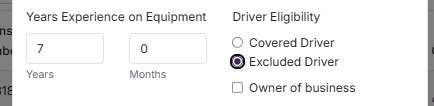
- Change the Driver Eligibility to Excluded Driver.
- Save the changes.
- Scroll to the bottom of the page and click Review.
- Read and agree to the Terms and then click Request Quote.
Just remember - all changes made during the policy term will need to be finished with binders.
Here's how to request a bind:
- Click Request to Bind.
- Read and agree to the Terms and then type your name to authorize and approve and then click Request to Bind.
- Our system will instantly bind those changes and email the binding documents directly to the agent.
- And that's it - You're done!